
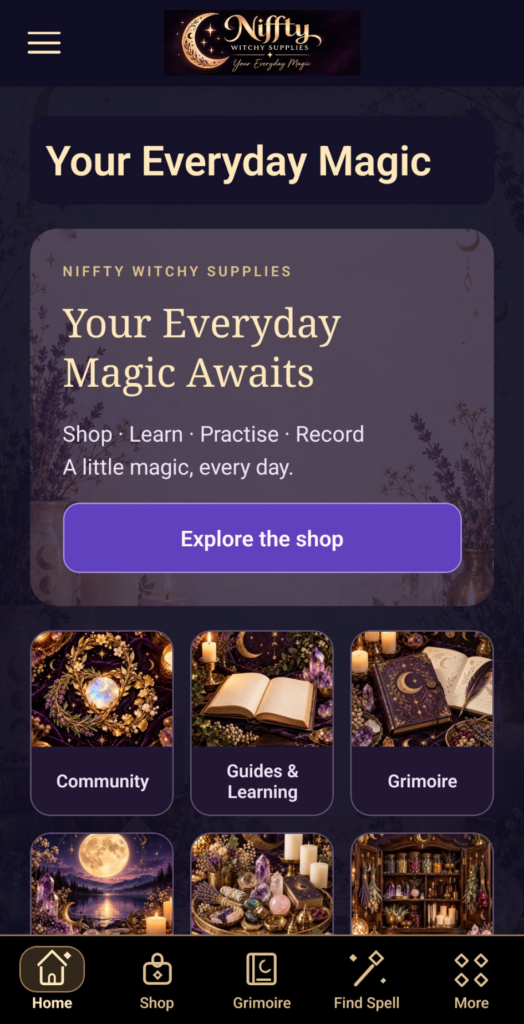
We created the Niffty app to bring useful witchcraft tools and the Niffty community together in one place. A place to learn something, keep your own notes, organise the supplies you already have and connect with other adults when you want to.
The app is free to download on Android through Google Play in the UK and is intended for adults aged 18 and over. Here is the thinking behind it, along with a few simple ways to make it useful in your own practice.
Why we started the app
Learning and practising can involve a lot of small, connected things: a guide you want to read again, a question to think about, supplies to remember and a note about something you tried. The purpose of Niffty is to bring those things closer together.
You can move from a learning guide to a personal Grimoire entry, or check your Cupboard while planning what to use. If you would like to share ideas, the optional Community gives you somewhere to connect. You can also keep your use of the app focused on your own learning and records.
That is the idea at the heart of it: useful tools, room for your own approach and a connection to Niffty in one app. You can see the current features and screenshots on our Niffty app page.
Four ways to use it in everyday practice
1. Learn one small thing and come back to it
The guides and Learning Hub give you places to explore subjects such as tarot, crystals, altar practice and moon traditions. Bookmarks and learning progress help you return to something that interests you.
A simple starting point is to choose one subject, read a guide and write down a question. You do not have to work through every topic at once. Let your curiosity decide what comes next.
2. Make your Grimoire your own
Your personal Grimoire can hold journal entries, dreams, intentions, tarot reflections and notes about your practice. Photos, tags and search help you organise what you save.
For example, you might record the question behind a tarot reflection, one detail you noticed and a later thought about it. Or keep a short note about a seasonal change outside your window. These are ways to build your own record, with space for questions and changing ideas.
If you prefer writing by hand as well, our first ten pages guide offers prompts you can adapt to either a notebook or a digital entry.
3. Keep track of what is in your Cupboard
My Cupboard lets you record supplies, quantities and usage, put together spell kits and keep a restock list. It gives you a reference when you are planning, rather than relying on memory.
Start by adding a few items you already own and checking that their quantities are right. Update the records when you use something. The list is most useful when it reflects what is actually on your shelf.
4. Give moon notes a place to live
The app includes moon-phase information, a Moon Journal and a calendar for personal plans and reminders. You might use them to note an observation, set aside time for reflection or revisit an intention later.
You choose how much spiritual meaning to give those entries. Sky calculations are approximate, and the app’s spiritual content is for learning, personal reflection and entertainment. It does not promise particular outcomes.
Community when you want company
The optional adult Community brings together profiles, conversations, local groups, shared posts and events. There are reporting and blocking tools, and you choose what you share.
Community requires its own profile. Having a shopping account does not automatically turn you into a public Community member. You can explore the personal tools without creating that public presence.
If you decide to join in, read the Community rules and review your privacy choices first. Local groups, posts and events are member-created, so check the details of anything you are considering attending.
A few practical things to know
- Free download, separate shopping: downloading the Android app is free. Physical goods bought through the shop are separate purchases, with UK-delivery checkout.
- Some features need a connection: the included learning guides and Spell Library work offline. Shopping, checkout, Community, account information and external links need internet access.
- Private records are held locally: Grimoire, Cupboard, Moon Journal and Collections records are stored in the Android app’s encrypted local storage. They do not automatically sync between devices.
- Look after your exports: use the Grimoire export option for entries you want to keep separately. Exported files are not encrypted by the app, so store them carefully and check what you have saved before changing devices.
- Shared content works differently: Community content you choose to share is stored by the service. Messages are not end-to-end encrypted. Read the app privacy notice before deciding what to share.
Start with one thing that is useful to you
For a first visit, try bookmarking a guide, making one Grimoire entry or adding a few supplies to your Cupboard. You can explore the rest as you need it.
We started Niffty to bring learning, personal tools and community together. How you use that space can be as simple or as varied as your own practice.
Download Niffty Witchy Supplies on Google Play, or take a look inside the app before you get started.